

 Author:
Jan Vega
Author:
Jan Vega
Manage a remote VA team by outcomes, not activity. Give each role three to five KPIs tied to results, such as response time for guest communication or monthly close date for bookkeeping. Run a fixed check-in rhythm: a short written update every day, a 30-minute one-on-one every week, a scorecard review every month, and a role review every quarter. When a number slips, check the process before blaming the person. Delegate’s client success managers run this kind of check-in cadence alongside you, which takes much of the management load off a founder with several assistants.
The first month usually goes well. You’re paying attention, feedback is fast, and everyone knows what matters. Then the business gets busy.
Here’s how it tends to unfold. A founder has two assistants, one on the inbox and one on bookkeeping. Check-ins slide from weekly to “when something comes up.” Three months later, the bookkeeping close is landing on the 20th instead of the 10th, and nobody raised it, because nobody was watching that number. The assistant assumed the new date was fine. The founder assumed things were on track.
Nobody did anything wrong. There just wasn’t a system. A structured first 30 to 90 days gets an assistant up to speed. This article covers what keeps a team on track after that.
1. Measure outcomes, not activity. Hours logged and screenshots captured tell you someone was online. They don’t tell you whether the inbox is under control or the books are right.
2. Keep it to three to five KPIs per role. Track twelve numbers and none of them get attention. Pick the ones that show whether the role is doing its job.
3. Set a baseline before you set a target. Measure the current state for two to four weeks first. A target pulled from thin air either demoralizes people or sets the bar too low to matter.
4. Write down how each number is measured. “Response time” means nothing until you define it: first reply or full resolution, business hours or around the clock, all messages or only guest messages.
Targets depend on your business, so set them from your own baseline. The examples show the kind of target that works.
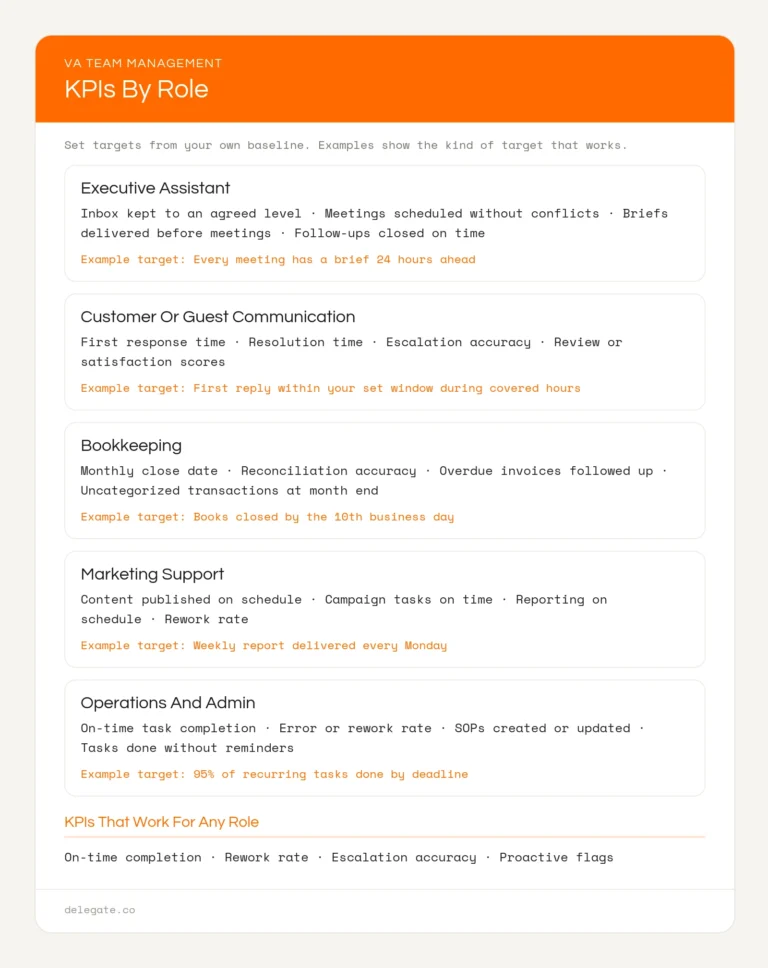
Four KPIs that work for any role:
The last one says the most about how an assistant thinks. An assistant who spots a problem early is worth more than one who’s fast but quiet.
For guest-facing roles specifically, response time carries extra weight. A slow reply in the first 24 hours of a stay is often where bad reviews start.
Four layers, each with a different job:
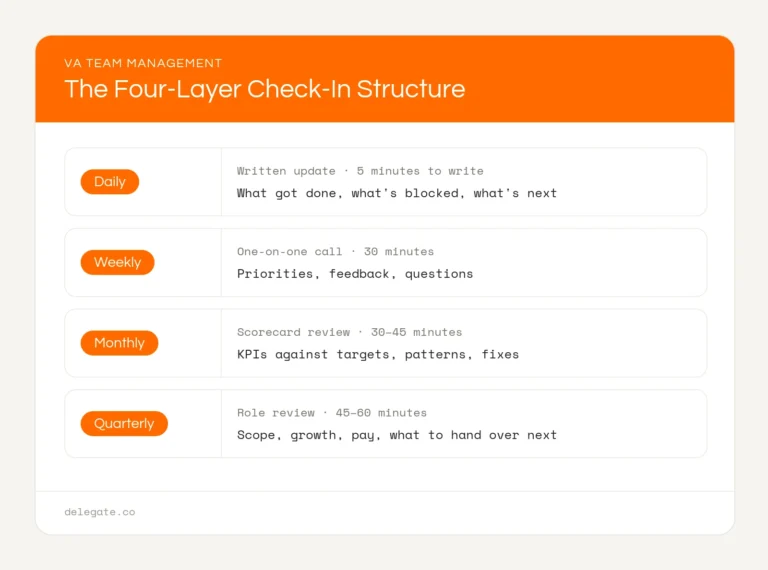
Daily update. Written and asynchronous, so it works across any time zone. Keep the format fixed:
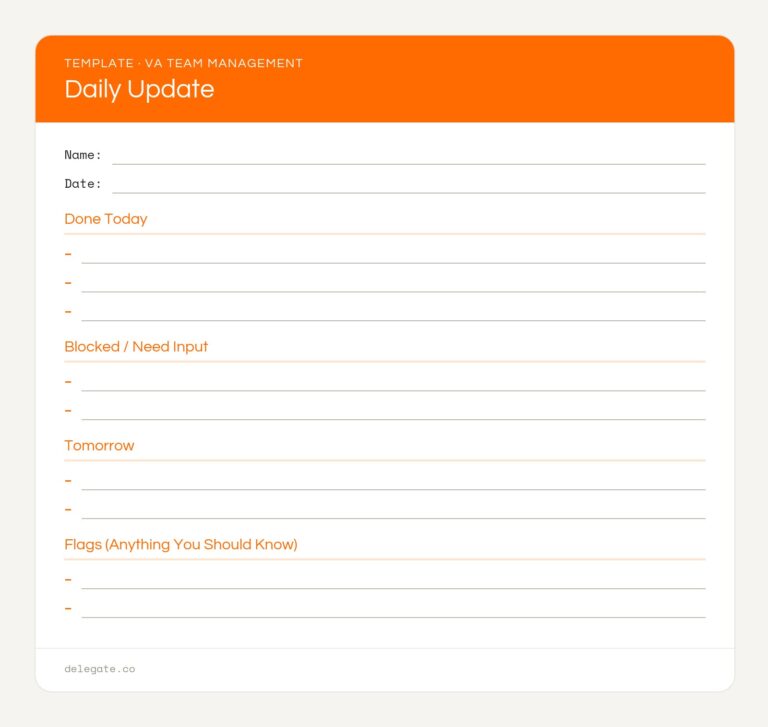
If you read nothing else, read the “blocked” and “flags” lines.
Weekly one-on-one. Same time each week, and it doesn’t get cancelled when you’re busy, since that’s exactly when it matters most. A simple agenda:
1. Anything blocked right now
2. Top priorities for next week
3. One piece of feedback in each direction
4. Anything that should become an SOP
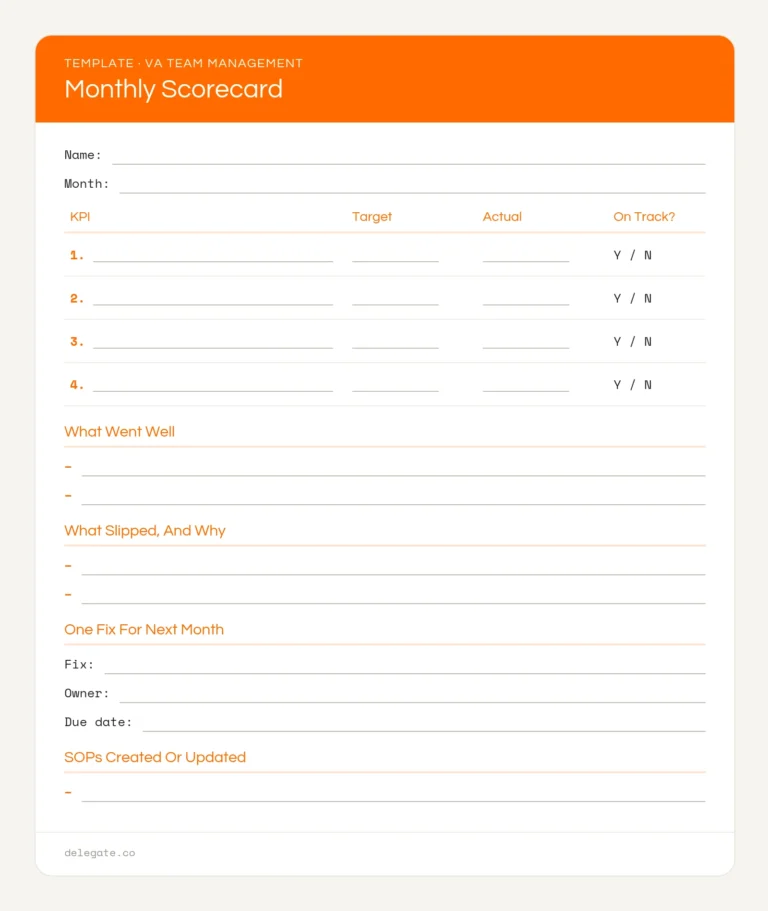
Monthly scorecard review. Go through each KPI against its target. For anything off track, decide on one fix and an owner. Keep it short and specific.
Quarterly role review. Step back from the numbers. Is the scope still right? What’s the assistant ready to take on? Is it time to talk about a raise or a bonus? Recognizing good work is part of keeping good people.
A team adds a coordination problem that a single assistant doesn’t have.
Documented SOPs matter even more here. They’re what let one assistant cover for another when someone’s out.
Most offshore VA teams work while you’re asleep, at least for part of the day. Plan for that.
If you pay hourly, you need an accurate record of hours. That’s billing. It isn’t management.
Screenshot monitoring and activity scores measure whether someone is at the keyboard. They don’t measure whether the work is good, and they signal that you don’t trust the person. Most founders get better results from clear KPIs and a steady check-in rhythm than from surveillance tools. If an assistant is hitting their numbers, the minute-by-minute activity doesn’t matter much.
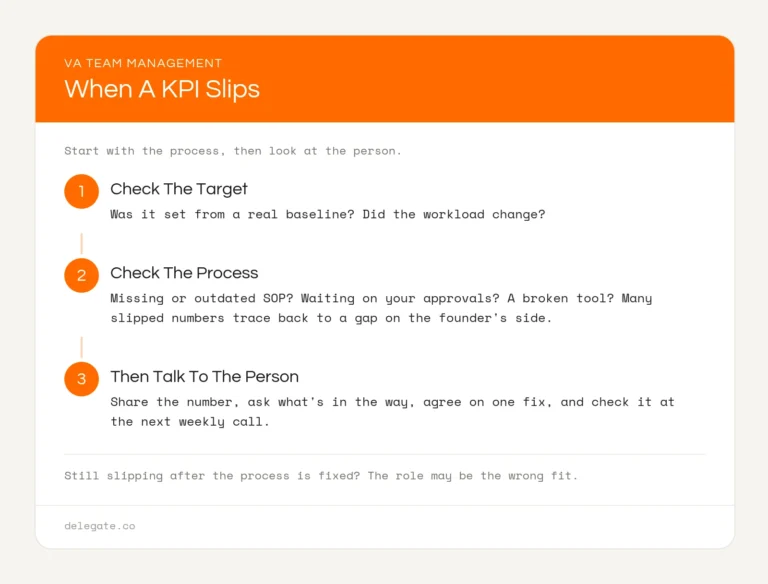
Start with the process, then look at the person.
1. Check whether the target was realistic. Was it set from a real baseline? Did the workload change?
2. Check the process. Is the SOP missing or out of date? Is the assistant waiting on you for approvals? Is a tool broken? Many slipped numbers trace back to a gap on the founder’s side.
3. Then talk to the person. Share the number, ask what’s getting in the way, agree on one fix, and check it at the next weekly call.
If the same KPI keeps slipping after the process is fixed, it may be the wrong fit for the role. Recognizing when an assistant has become a bottleneck is easier when you have the numbers in front of you.
Three to five per role, tied to outcomes. Common ones include on-time task completion, rework rate, and escalation accuracy, plus role-specific metrics like response time for customer support or monthly close date for bookkeeping.
A short written update daily, a 30-minute call weekly, a scorecard review monthly, and a role review quarterly. The daily update is written, so it works across time zones.
Default to written communication, keep one shared task board, protect a short overlap window for live calls, and decide in advance what counts as urgent enough to wake you.
Track hours if you pay hourly, because that’s billing. For managing performance, outcome KPIs and regular check-ins work better and build more trust than activity monitoring.
Check whether the target was realistic, then check the process for missing SOPs, slow approvals, or broken tools. Only then discuss it with the assistant, and agree on one specific fix.
With several assistants, you need clear ownership by function, one shared task board, written handoff rules, and one point of contact for priorities. Without those, work falls between people.
The system above works. It also takes time every week, and that time grows with each assistant you add.
With Delegate, you aren’t running it alone. Every placement comes with a dedicated client success manager who starts with a meet-and-greet, holds weekly check-ins through the first month, then moves to twice a month and monthly, or whatever rhythm suits your team. Onboarding includes an SOP consultation, so the documentation that makes coverage and handoffs work exists from the start. If a placement isn’t working even after the process is fixed, replacement is free for as long as you’re a client, with new candidates in 7 to 14 days.
Assistants are vetted through paid work simulations and start at $13 an hour, month to month. Book a strategy call and tell us how many people you’re managing now. We’ll show you where Delegate can take work off your plate.